
When Do I Complete This eForm?
The Departure eForm is intended to be submitted when you are ready to close your F-1 or J-1 immigration record. Some reasons include:
- Graduated from or completed your program
- Transfer* to another U.S. university or college (*see transfer out notes at bottom of page)
- Transfer to a university outside of the U.S.
- Leave the U.S. permanently
- Withdraw from CSU
- Change to another visa status
- Changing to Permanent Residency or Asylum Seeking
- Review the important information about maintaining your immigration record while these applications are pending.
Please do not use this form if you are planning to travel or need to keep your immigration active, for example, if you will stay in the U.S. on OPT or Academic Training.
Instructions for Completing This eForm
- Fill out all of the required fields, marked with an asterisk.
- Choose at least one “Reason for Leaving.”
- Click submit at the bottom of the eForm.
- Optional: Fill out the Departure Survey provided in the submission confirmation email
Depending on the time of academic year, it may take up to 7-10 business days for our office to process your request once our office receives your eForm.
Alumni Log-in
If your CSU eID is still active, you can log into your WorldRams account through the button at the top of the page.
However, if it has been more than 12 months since you graduated from CSU it is likely that your eID has expired and we will need you to sign into your WorldRams account through the Limited Access Portal in the link below:
- Step 1: Get your PIN
- E-mail me my Limited Access PIN
- You will receive an email with your PIN – when you click the link below to access the form it will ask you for your University Identification Number. This is your CSU Student ID number that begins with an 8.
- Step 2: Log into the WorldRams Limited Access account
*For Those transferring out of CSU (transfer out / SEVIS Transfer)
- The transfer out (AKA “transfer release”) is the earliest day your new school will be able to issue an I-20 for you.
- If you have international travel plans that bring you back to the U.S. after your transfer out date, you will need your new school’s I-20 in order to re-enter the U.S.
- We can schedule transfer outs ahead of time. Then, the transfer out will occur automatically when the calendar switches to the release date.
- Your last day of any on-campus work permissions at CSU end the day before your transfer out.
- The earliest day you can begin working on-campus at your new school is the transfer release date.
- There is no requirement for the degree level on your CSU record to match the degree level for the program you will begin at the new school. In fact, most transfers occur when someone completes a lower degree level at CSU and then begin a higher degree level at the new school where they will transfer to.
Does your new school require CSU to complete a “Transfer Clearance Form” or “Transfer-in Form”?
- If yes but your new school says they need our contact information first, please submit your departure form and the CSU ISSS advisor assigned to your case will contact you so you know what information to provide to your new school. Your new school will then provide our CSU ISSS advisor assigned to your case with some online login credentials to fill out their secure transfer clearance form.
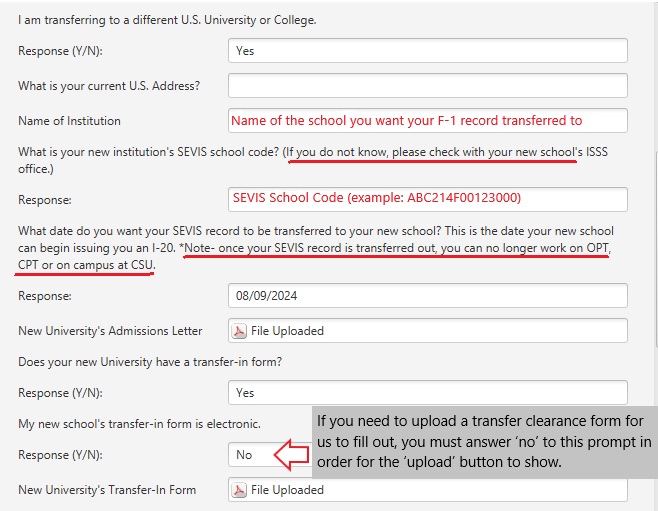
- If yes, and they share it with you as a pdf, then on the Departure Form, you should answer ‘no’ to the prompt “My new school’s transfer-in form is electronic;” otherwise, the upload button will not appear. See example image below: